About this post
Type of technique: free association
Techniques in a nutshell: use the beginning or end letters of a word to trigger a new word.
Or use the whole word to trigger well known phrases or sentences.
I have been using these three free-association techniques. They can quickly create a large list of words that can be used as random stimuli, to profile a subject, or to suggest focuses for creativity.
'Suffix' method
To use the 'suffix' method I start out with an initial word and use the final letter or letters of that word to trigger another word (or phrase). So, for example, with a starting word 'usher' I select either one, two, three or four of the final letters and see if a possible word is triggered. Selecting 'sher' - for me - triggers the word 'Sheringham'. Then from that word I select the final two letters 'am' to trigger the word 'amateur'. I can also choose to set a quota and list several words (to take me beyond the obvious choices).
Example of Suffix method:
Amateur, urn, national, alley, eye, yes, estuary, Rymans, answers, erstwhile, leapyear, earpiece, century, Ryan Giggs, seed, editor
If I set a quota of ten at that point from the word 'editor' and its final three letters 'tor' I could make a list of:
Tory, torpid, tornado, toreador, torpedo, tornoi, torque, torn, Tora! Tora! Tora!, Tori Amos
'Prefix' method
The 'prefix' method is similar to the suffix method, but I use letters at the start of the word to trigger a new word/phrase. Example:
Banana, banish, bannister, Bangladesh, bandana, bap, baptism, barter, bartender, bat, battery
Suffix and Prefix methods used in conjunction
I use the prefix and suffix methods in conjunction. Here is an example of this (I have highlighted the chosen letters that were used to trigger the next word/phrase in red):
Comedy, communist, sternum, numismatist, numbness, essential, alimony, align, gnasher, gnat, national, Navratilova, ovation, Overlord, ordinal, altimeter, terrible, blemish, bleeder, blimp, Blowfelt, tankard, Ardal O'Hanlon
Catchphrase method
I use the catchphrase method in conjunction with the prefix and suffix methods. With the catchphrase method I select a word and use it to trigger catchprases, well known phrases or any phrase or sentence.
Examples with some of the words from the example above:
National: National Velvet, national miners' strike, national curriculum, Grand National, national pride,
Essential: essential oils, essential selection
Terrible: Terrible Tim Witherspoon, a terrible waste, terrible twos, infant terrible
Saturday, December 03, 2005

Monday, November 28, 2005
Creativity technique: naming/listing people
About this post
Technique in a nutshell: when you want to create a list of people, colour/texture the action of naming by using adjectival phrases or words.
Example: Name a party person
It can help to generate a list of disparate people to help with creativity; considering the fantasy input of others - both real people and fictional people - can provide interesting perspectives on creative effort or problem solving. The lists can also be used to help kick-start creativity at the blank page stage.
I can start out with a simple directive such as:
Name a person
And name a few people. But to add colour to the naming I can select a random word (from a dictionary, directed free association results or wordcount.org) and use it adjectivally. With a random word such as 'code' I get the directive:
Name a code person
and I can name as many people as possible - perhaps working to a quota of five or any other number:
1) Alan Turing
2) Dan Brown
3) Mona Lisa (Mona Lisa is an anagram of 'I also man' - some consider that the Mona Lisa is a depiction of Leonardo da Vinci as a woman)
4) Samuel Morse
5) Samuel Pepys
I can opt to use two adjectival words instead of one to further colour the naming (and add extra challenge!). So with the random words 'eye' and 'death' I create the directive:
Name an eye death person
and list five people. NB: I always try to complete five namings, even if some of them are a bit of a cheat or a slight interpretation on the meaning of the adjectival words.
1) King Harold
2) Peter Cook
3) Peter Falk
4) The Grim Reaper (A cheat: he eyes dead people)
5) Evil Knievel
Using the lists
Once I have built up a sizeable list of people I can use it for creative thinking.
If I am at the blank-page stage wondering 'what can I create?' then the following question can kick-start my thinking:
What would X invent?
and I consider what any person from the list would invent. Perhaps:
King Harold: a suit of armour to protect the eyes
Alan Turing: ways for a computer to improve its performance in the Turing Test.
Peter Falk: clever tricks that Columbo can use to catch out killers
I can also track (or guess-track) a person throughout their life and ask the question:
What did X invent/create throughout their life?
and consider any ideas they may have created throughout the various stages of their life.
Technique in a nutshell: when you want to create a list of people, colour/texture the action of naming by using adjectival phrases or words.
Example: Name a party person
It can help to generate a list of disparate people to help with creativity; considering the fantasy input of others - both real people and fictional people - can provide interesting perspectives on creative effort or problem solving. The lists can also be used to help kick-start creativity at the blank page stage.
I can start out with a simple directive such as:
Name a person
And name a few people. But to add colour to the naming I can select a random word (from a dictionary, directed free association results or wordcount.org) and use it adjectivally. With a random word such as 'code' I get the directive:
Name a code person
and I can name as many people as possible - perhaps working to a quota of five or any other number:
1) Alan Turing
2) Dan Brown
3) Mona Lisa (Mona Lisa is an anagram of 'I also man' - some consider that the Mona Lisa is a depiction of Leonardo da Vinci as a woman)
4) Samuel Morse
5) Samuel Pepys
I can opt to use two adjectival words instead of one to further colour the naming (and add extra challenge!). So with the random words 'eye' and 'death' I create the directive:
Name an eye death person
and list five people. NB: I always try to complete five namings, even if some of them are a bit of a cheat or a slight interpretation on the meaning of the adjectival words.
1) King Harold
2) Peter Cook
3) Peter Falk
4) The Grim Reaper (A cheat: he eyes dead people)
5) Evil Knievel
Using the lists
Once I have built up a sizeable list of people I can use it for creative thinking.
If I am at the blank-page stage wondering 'what can I create?' then the following question can kick-start my thinking:
What would X invent?
and I consider what any person from the list would invent. Perhaps:
King Harold: a suit of armour to protect the eyes
Alan Turing: ways for a computer to improve its performance in the Turing Test.
Peter Falk: clever tricks that Columbo can use to catch out killers
I can also track (or guess-track) a person throughout their life and ask the question:
What did X invent/create throughout their life?
and consider any ideas they may have created throughout the various stages of their life.
Saturday, November 26, 2005
Supertools: for fiction and 'real world' creativity
About this post
Post in a nutshell: imagine you meet a magical being who gives you special powers:
You can choose any area in space where the powers operate. You can pinpoint and see anything in that area. You can move anything anywhere you want. You can follow anything backwards and forwards in time. You can possess anything. You can intensify or decrease a characteristic of anything. You can create a clone of anything then alter that clone. You can swap items. You can do any action. You can make anything else capable of using the powers.
I devised this range of supertools to be used when writing stories. They can also be constructively used with 'real world' creativity.
Supertools and fiction
As a range of tools used for an aid when writing fiction, I wanted the tools to have the potential to make anything possible within a story - so that anything can happen and any change can occur instantly or over a longer time period. I also wanted to entertain the possibility that restrictions could be applied to the tools to create difficulty and conflict within the story.
If I apply the supertools myself (as a story's writer) then I can use the tools in conjunction to set up any possible starting scenario. I can also use them to create 'what if?' possibilities - where I can create any possible development to see where that takes the story.
If I consider how a story's proponent (or any character) can use the tools (perhaps by introducing a magical character such as a deus ex machina or genii type character to empower the proponent/character) then - because the tools make anything possible - the character would be able to use the tools to solve problems, resolve conflict, or even set up any problem or difficult scenario for other characters.
Supertools and real world creativity
When applied to 'real world' creativity, the supertools can be used to create 'What if?' questions, discover problems, and suggest 'magical' solutions.
The Supertools
The supertools are as follows:
Zone of Attention, Superselect, Supermove, Track, Possess, Er, X-versions, What's X?, Swap, Other, Toolable
and they are used in conjunction with the BOSNIA ' ' ' tool.
Here is a brief overview of the tools:
Zone Of Attention
(See Zone of Attention post.)
A character can select a Zone of Attention. In this zone he will be able to operate any of the supertools. He can select a zone ranging in size from the atomic level all the way up to the entire universe.
Superselect
A character needs to select something that will be the 'target' when the supertools are applied. Perhaps he will have a machine that can superselect, or a deus ex machina or genii effects the superselect. To use superselect the character simply states what things in the Zone of Attention will be operated on by the supertools. He can state a directive such as:
Superselect all terrified people
and if his Zone of Attention had been 'planet earth' then he will be able to see all the terrified people on earth and they become the target. The character then has the option to carry out any supertool on them.
Superlatives can also be used to refine the target. So a character could state the directive:
Superselect the angriest people
Supermove
With a target selected the character can move that target anywhere he wants. If he had selected himself as the target he could move himself anywhere too.
Track
(See Track and Freeze post.)
A character can use Track to follow a chosen target back in time or forward into the future.
Possess
A character can choose to possess any other character or even animals or objects.
ER
With the ER supertool, a character can alter a characteristic of a target. Say, for example, the character has selected the moon as a target. He can then identify a characteristic of the moon and then change the degree of that characteristic. A characteristic will usually be described by an adjective or a phrase with an adjectival function. Example:
The moon is close
Application of the supertool ER means that the character can choose to make the moon closer or further away. These options can be written as: closER and furthER. The ER supertool also allows a character to choose the rate of change. So if a character chooses the 'closER' option for the moon and opts to make the change gradual then we have plenty of time to observe the ensuing panic on planet earth!
X-versions
(See X-versions post).
The X-versions tool is used to create a different variety of a chosen target. (I have so far used this myself to create ideas for stories rather than consider how this could empower a character). For example, on one occasion I considered the Fight Club. One X-version created was:
Animal fight club
which led to the idea of a club where people fight animals for an audience.
What's X?
(See Zone of Attention Profiling post.)
This is another supertool I have used to both profile a Zone of Attention and also suggest ideas on what could be included in a Zone of Attention.
Swap
Swap allows a character to choose two targets within the Zone of Attention and literally swap their locations. Swap is great for forming 'What if?' questions.
Other
Other is expressed in a simple sentence format:
Character does X X
The first 'X' is replaced by a verb/action and the second 'X' is replaced by a target for the action. I can choose a verb and a subject to complete a sentence such as:
Character does attack the plan
Other can also be used to suggest 'superhero' powers, so I can think of superhero-type powers and see what effect this has on the story. For example:
Character can subdue people
which may suggest a superpower that allows the character to make people fall asleep by touching them.
Toolable
The Toolable supertool means that a character can make any person/object/thing/place capable of doing a chosen supertool. So, for example, a character could choose to make a wristwatch capable of superselecting people who have just won the lottery.
BOSNIA ' ' '
The acronym BOSNIA' ' ' is used to specify targets of supertools. BOSNIA stands for:
B. All but X (Where X is a chosen number)
O. One
S. Some
N. Number (Where a number must be specified)
I. Itself (Meaning an action is reflected back onto the user of the supertool)
A. All
The ' ' ' is a reminder of the possibility of carrying the action of the supertool over onto something associated with the initial target. So if an action is stated thus:
Man attacks dog
then the ' is a reminder of the possibility of:
Man attacks dog's owner.
The ' ' ' suggest the action can be carried even further:
Man attacks dog's owner's house.
Example of BOSNIA in use
Say for example my Zone of Attention is 'planet earth' and my directive for superselect is:
Superselect the angriest people
then each of the BOSNIA options could change that directive thus:
B: Superselect all but five angriest people
O: Superselect one angriest person
S: Superselect some angriest people
N: Superselect twenty angriest people
I: Superselect me as the angriest person
A: Superselect all the angriest people
and using ' ' ' could suggest:
Superselect the angriest people's friend's occupations.
Post in a nutshell: imagine you meet a magical being who gives you special powers:
You can choose any area in space where the powers operate. You can pinpoint and see anything in that area. You can move anything anywhere you want. You can follow anything backwards and forwards in time. You can possess anything. You can intensify or decrease a characteristic of anything. You can create a clone of anything then alter that clone. You can swap items. You can do any action. You can make anything else capable of using the powers.
I devised this range of supertools to be used when writing stories. They can also be constructively used with 'real world' creativity.
Supertools and fiction
As a range of tools used for an aid when writing fiction, I wanted the tools to have the potential to make anything possible within a story - so that anything can happen and any change can occur instantly or over a longer time period. I also wanted to entertain the possibility that restrictions could be applied to the tools to create difficulty and conflict within the story.
If I apply the supertools myself (as a story's writer) then I can use the tools in conjunction to set up any possible starting scenario. I can also use them to create 'what if?' possibilities - where I can create any possible development to see where that takes the story.
If I consider how a story's proponent (or any character) can use the tools (perhaps by introducing a magical character such as a deus ex machina or genii type character to empower the proponent/character) then - because the tools make anything possible - the character would be able to use the tools to solve problems, resolve conflict, or even set up any problem or difficult scenario for other characters.
Supertools and real world creativity
When applied to 'real world' creativity, the supertools can be used to create 'What if?' questions, discover problems, and suggest 'magical' solutions.
The Supertools
The supertools are as follows:
Zone of Attention, Superselect, Supermove, Track, Possess, Er, X-versions, What's X?, Swap, Other, Toolable
and they are used in conjunction with the BOSNIA ' ' ' tool.
Here is a brief overview of the tools:
Zone Of Attention
(See Zone of Attention post.)
A character can select a Zone of Attention. In this zone he will be able to operate any of the supertools. He can select a zone ranging in size from the atomic level all the way up to the entire universe.
Superselect
A character needs to select something that will be the 'target' when the supertools are applied. Perhaps he will have a machine that can superselect, or a deus ex machina or genii effects the superselect. To use superselect the character simply states what things in the Zone of Attention will be operated on by the supertools. He can state a directive such as:
Superselect all terrified people
and if his Zone of Attention had been 'planet earth' then he will be able to see all the terrified people on earth and they become the target. The character then has the option to carry out any supertool on them.
Superlatives can also be used to refine the target. So a character could state the directive:
Superselect the angriest people
Supermove
With a target selected the character can move that target anywhere he wants. If he had selected himself as the target he could move himself anywhere too.
Track
(See Track and Freeze post.)
A character can use Track to follow a chosen target back in time or forward into the future.
Possess
A character can choose to possess any other character or even animals or objects.
ER
With the ER supertool, a character can alter a characteristic of a target. Say, for example, the character has selected the moon as a target. He can then identify a characteristic of the moon and then change the degree of that characteristic. A characteristic will usually be described by an adjective or a phrase with an adjectival function. Example:
The moon is close
Application of the supertool ER means that the character can choose to make the moon closer or further away. These options can be written as: closER and furthER. The ER supertool also allows a character to choose the rate of change. So if a character chooses the 'closER' option for the moon and opts to make the change gradual then we have plenty of time to observe the ensuing panic on planet earth!
X-versions
(See X-versions post).
The X-versions tool is used to create a different variety of a chosen target. (I have so far used this myself to create ideas for stories rather than consider how this could empower a character). For example, on one occasion I considered the Fight Club. One X-version created was:
Animal fight club
which led to the idea of a club where people fight animals for an audience.
What's X?
(See Zone of Attention Profiling post.)
This is another supertool I have used to both profile a Zone of Attention and also suggest ideas on what could be included in a Zone of Attention.
Swap
Swap allows a character to choose two targets within the Zone of Attention and literally swap their locations. Swap is great for forming 'What if?' questions.
Other
Other is expressed in a simple sentence format:
Character does X X
The first 'X' is replaced by a verb/action and the second 'X' is replaced by a target for the action. I can choose a verb and a subject to complete a sentence such as:
Character does attack the plan
Other can also be used to suggest 'superhero' powers, so I can think of superhero-type powers and see what effect this has on the story. For example:
Character can subdue people
which may suggest a superpower that allows the character to make people fall asleep by touching them.
Toolable
The Toolable supertool means that a character can make any person/object/thing/place capable of doing a chosen supertool. So, for example, a character could choose to make a wristwatch capable of superselecting people who have just won the lottery.
BOSNIA ' ' '
The acronym BOSNIA' ' ' is used to specify targets of supertools. BOSNIA stands for:
B. All but X (Where X is a chosen number)
O. One
S. Some
N. Number (Where a number must be specified)
I. Itself (Meaning an action is reflected back onto the user of the supertool)
A. All
The ' ' ' is a reminder of the possibility of carrying the action of the supertool over onto something associated with the initial target. So if an action is stated thus:
Man attacks dog
then the ' is a reminder of the possibility of:
Man attacks dog's owner.
The ' ' ' suggest the action can be carried even further:
Man attacks dog's owner's house.
Example of BOSNIA in use
Say for example my Zone of Attention is 'planet earth' and my directive for superselect is:
Superselect the angriest people
then each of the BOSNIA options could change that directive thus:
B: Superselect all but five angriest people
O: Superselect one angriest person
S: Superselect some angriest people
N: Superselect twenty angriest people
I: Superselect me as the angriest person
A: Superselect all the angriest people
and using ' ' ' could suggest:
Superselect the angriest people's friend's occupations.
Inger profiling
About this post
Post in a nutshell: An inger is something that will carry out an action on a subject in the future, carries out action now, or has carried out an action in the past. Inger profiling aims to systematically list the ingers. An inger can be a person, place, object etc.
Uses: as a fiction tool the listing of ingers can help you to fill out a story. As a general creativity tool it can help when you are listing information about a subject.
I devised the concept of the 'inger' to aid Directed Free Association and profiling subjects. An inger is, quite simply, anything that carries out an action on a subject, has carried out an action on a subject, or will carry out an action in the future. 'Inger' is one of the category headings:
Duration (Time): Place: Inger: Thing (Object): Person: Having: Doing (Activity): Being: Saying: Feeling: Thinking: Knowledge
The category headings are used for free association (see Directed Free Association and Flip-flop Directed Association) and profiling subjects (see profiling subjects and profiling using category headings).
Listing ingers
Suppose my subject (creative focus) is 'Buckingham Palace'. I can set a directive:
List ingers for Buckingham Palace.
To answer this directive I can simply list anything that carries out an action on Buckingham Palace, has carried out an action in the past, or will (could) carry out an action in the future:
Tourists (visiting)
Rain (weathering)
Cleaners (cleaning)
Guards (guarding)
Architect (designing)
Servant (assisting)
Photographer (photographing)
Historian (chronicaling)
Listing actions
I can alternatively make a list of actions and then consider what carries out the action:
Attacking (satirist, terrorist, anti-monarchist)
Entering (The Queen, Prince Charles, Prime Minister, knighthood recipient, trespasser (!) )
Improving (decorator, The civil list, security expert, designer)
Profiting (from) (United Kingdom, tourist guides, postcard sellers, anyone employed there)
Passing (traffic, pedestrians, tourists, aeroplanes, busses, birds)
Modify ingers using Category Headings
I can modify an inger directive using one of the Category Headings above. For example, I can choose the Category Heading "Person" and form a directive thus:
Name a person-inger of Buckingham Palace.
Then list some actions and name persons/people who could carry out that action:
Cherishing (The royals, the inhabitants, the tourists, the royalists, tourguide operators)
Scandalising (The media, the journalist who infiltrated the ranks of the employees, tabloids, Wallace Simpson)
Filming (BBC1 cameraman, television company staff, tourists, foreign television companies)
The inger cycle
The inger cycle is a useful approach for listing information. It is also a good tool to use when building up information when writing stories. To effect the inger cycle I simply name a subject (A) then name an inger for that subject (B), then name an inger for B (C) etc.
Example:
Suppose my subject is "Charles Saatchi" - the art gallery curator. I name an action (annoying, for example) then consider someone who may annoy Charles Saatchi. Say, Brian Sewell the art critic. Which gives:
Charles Saatchi: Brian Sewell (annoying).
Then I list the next action (enthralling, for example) and consider someone who may enthral Brian Sewell. Say, the artist JMW Turner. Which gives:
Charles Saatchi: Brian Sewell (annoying): JMW Turner (enthralling)
I can continue this exercise as long as I like, building up a sizeable list of actions and people. At the end of the listing I cycle back to the beginning. So this means - in this example - that I consider what action Charles Saatchi carries out on JMW Turner. So something like:
Charles Saatchi: rates, collects, hates, envies etc.
I can allow a degree of guessing, especially if I am writing fiction.
Inger-x
I use the aide-memoire inger-x to remind me that (as with random stimuli approaches) I can name the thing that carries out the action first and then specify the action it/they may carry out at some time. For example (with the Buckingham Palace example) if I pick 'Ewan McGregor' for my 'X' then I can list actions such as:
Visit, appear in movie about, pass, read about, research etc.
So my final Category Headings list reads:
Duration (Time): Place: Inger-x: Thing (Object): Person: Having: Doing (Activity): Being: Saying: Feeling: Thinking: Knowledge
Post in a nutshell: An inger is something that will carry out an action on a subject in the future, carries out action now, or has carried out an action in the past. Inger profiling aims to systematically list the ingers. An inger can be a person, place, object etc.
Uses: as a fiction tool the listing of ingers can help you to fill out a story. As a general creativity tool it can help when you are listing information about a subject.
I devised the concept of the 'inger' to aid Directed Free Association and profiling subjects. An inger is, quite simply, anything that carries out an action on a subject, has carried out an action on a subject, or will carry out an action in the future. 'Inger' is one of the category headings:
Duration (Time): Place: Inger: Thing (Object): Person: Having: Doing (Activity): Being: Saying: Feeling: Thinking: Knowledge
The category headings are used for free association (see Directed Free Association and Flip-flop Directed Association) and profiling subjects (see profiling subjects and profiling using category headings).
Listing ingers
Suppose my subject (creative focus) is 'Buckingham Palace'. I can set a directive:
List ingers for Buckingham Palace.
To answer this directive I can simply list anything that carries out an action on Buckingham Palace, has carried out an action in the past, or will (could) carry out an action in the future:
Tourists (visiting)
Rain (weathering)
Cleaners (cleaning)
Guards (guarding)
Architect (designing)
Servant (assisting)
Photographer (photographing)
Historian (chronicaling)
Listing actions
I can alternatively make a list of actions and then consider what carries out the action:
Attacking (satirist, terrorist, anti-monarchist)
Entering (The Queen, Prince Charles, Prime Minister, knighthood recipient, trespasser (!) )
Improving (decorator, The civil list, security expert, designer)
Profiting (from) (United Kingdom, tourist guides, postcard sellers, anyone employed there)
Passing (traffic, pedestrians, tourists, aeroplanes, busses, birds)
Modify ingers using Category Headings
I can modify an inger directive using one of the Category Headings above. For example, I can choose the Category Heading "Person" and form a directive thus:
Name a person-inger of Buckingham Palace.
Then list some actions and name persons/people who could carry out that action:
Cherishing (The royals, the inhabitants, the tourists, the royalists, tourguide operators)
Scandalising (The media, the journalist who infiltrated the ranks of the employees, tabloids, Wallace Simpson)
Filming (BBC1 cameraman, television company staff, tourists, foreign television companies)
The inger cycle
The inger cycle is a useful approach for listing information. It is also a good tool to use when building up information when writing stories. To effect the inger cycle I simply name a subject (A) then name an inger for that subject (B), then name an inger for B (C) etc.
Example:
Suppose my subject is "Charles Saatchi" - the art gallery curator. I name an action (annoying, for example) then consider someone who may annoy Charles Saatchi. Say, Brian Sewell the art critic. Which gives:
Charles Saatchi: Brian Sewell (annoying).
Then I list the next action (enthralling, for example) and consider someone who may enthral Brian Sewell. Say, the artist JMW Turner. Which gives:
Charles Saatchi: Brian Sewell (annoying): JMW Turner (enthralling)
I can continue this exercise as long as I like, building up a sizeable list of actions and people. At the end of the listing I cycle back to the beginning. So this means - in this example - that I consider what action Charles Saatchi carries out on JMW Turner. So something like:
Charles Saatchi: rates, collects, hates, envies etc.
I can allow a degree of guessing, especially if I am writing fiction.
Inger-x
I use the aide-memoire inger-x to remind me that (as with random stimuli approaches) I can name the thing that carries out the action first and then specify the action it/they may carry out at some time. For example (with the Buckingham Palace example) if I pick 'Ewan McGregor' for my 'X' then I can list actions such as:
Visit, appear in movie about, pass, read about, research etc.
So my final Category Headings list reads:
Duration (Time): Place: Inger-x: Thing (Object): Person: Having: Doing (Activity): Being: Saying: Feeling: Thinking: Knowledge
Monday, November 21, 2005
Profiling the Zone Of Attention
About this post
Type of technique: profiling (listing information)
The technique helps to find both the obvious and non-obvious features of a scenario.
Technique in a nutshell: choose an area in space and ask questions in the format: What's x? For x, choose an adjectival word or phrase. Example: 'What's dangerous?'
See also posts:
Zone of Attention
Profiling Subject
Profiling the Zone of Attention
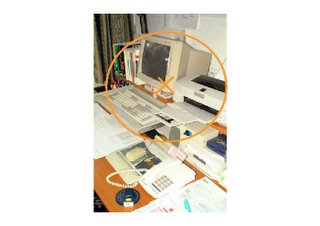 I devised this useful bag of tools to help profile Zones of Attention. If I project a Zone of Attention onto an observed scene or a scene I am visualising in my imagination then I can use the tools to to list information about the contents of the Zone of Attention.
The impossible ideal would be to list everything in the ZOA. This would include physical aspects ranging from every single atom up to the largest objects in the ZOA, and occurences ranging from switching the computer on up to spending hours frantically trying to correct a computer problem.
Obviously the ideal isn't reachable but I want to work with a mindset of working towards that ideal. I also want to ensure that I list both the obvious and the non-obvious. In fact, some things are so obvious that they are difficult to see!
The Tools
Area selection. Duration selection. Pinpoint selection. Size selection. Shape selection. Adjective selection. Colour selection. Volume selection. Action selection. Quantity selection.
Area selection
With area selection I set a question in the format:
What's X?
and I choose a number. For example, 3. Then I choose a measurement - say centimetres - to give:
What's 3 cm?
Then I consider the Zone of Attention (such as the one with the computer above) and pick out objects that are about 3 cm in size, length, diameter etc. Remembering that the Zone of Attention is three dimensional I can pick out any object in the ZOA - including objects that are unseen (inside the computer etc.) I can also allow a degree of guessing.
Possible objects selected for 'What's 3cm?': the logo on the top of the monitor, the return key, the thickness of the front section of the monitor, the length of one of the 'telescopic' sections of the printer tray etc.
This listing could go on indefinitely.
I can select other measurements - I can choose to set a number of different 'What's X?' questions before I start listing information:
What's 1 cm? What's 10 cm? What's 1 mm? etc.
I can range from the smallest measurement (perhaps even considering the atomic level) up to the largest measurement - which would be the diameter of the Zone of Attention itself.
Duration selection
Duration selection can be used to list activities or occurences in the Zone of Attention. As with area spotting it takes the form:
What's X?
and I select a number and any time duration:
What's 1 second?
I then list activities for this Zone of Attention that occur over one second: switching on the PC, taking a piece of paper off the printer tray, shutting down, sipping a coffee, pressing any computer key during typing, etc.
As with area spotting this listing can go on indefinitely. I can also select different durations for different results:
What's a millisecond? What's 10 seconds? What's 3 days? What's 10 years?
For 'What's 10 years' I could consider something like 'the useful lifetime of the computer' , for example.
Pinpoint selection
Pinpoint selection is the simplest method of all: I move the pinpoint (the X inside the ZOA) around the Zone of Attention and name the object that is at the location of the pinpoint.
For example: the computer, the keyboard, the desk, the CPU, the monitor glass, the computer stand etc.
Size selection
With size selection I set a question in the format:
What's the size of X?
For the X I can either select a random object from a page of Directed Association results or choose an object in the Zone Of Attention. These could lead to questions such as:
What's the size of an apple?
What's the size of the space bar?
Shape selection
With shape selection I set a question in the format:
What's the shape of X? (or what's approximately the shape of X?)
For the X I can either select a random object from a page of Directed Association results or choose an object in the Zone Of Attention. These could lead to questions such as:
Random object: What's the shape of an umbrella?
Using an object in the Zone of Attention: What's the shape of the space bar?
Adjective selection
With adjective selection the question is, again, in the format:
What's X?
but I select an adjective for the X myself. I do this by selecting an object/place etc. from the Directed Association results and then listing possible adjectives for that chosen object/place. So if I pick:
Alcatraz prison
then I can list adjectives such as: grey, imposing, closed, historic etc. I can also make up 'adjectives' such as 'featured in a feature film' etc.
I then choose one of the adjectives ('closed' for this example) and then set the question:
What's closed?
and consider what things in the Zone of Attention are closed. For example: the access panel on the computer that is screwed shut (as with the keyboard), the lid of the printer, the books on the shelf etc.
Adjectives I have found to be useful: colour selection and volume selection
I have found that specifying colours and volumes has proved useful when listing information. These are specified for the questions:
What's coloured X?
What's volume: X?
So, for example, resulting questions could be:
What's coloured blue?
What's volume: quiet?
(With the volume question I can range from a scale of 'silent' up to 'deafening'.)
Action selection
With action selection I use the question format:
What's X - ing?
and then list actions. For example: leaving, reading, cooling, amazing, assisting, towering, lowering etc. ad infinitum.
I then select an adjective from the list ( 'cooling') and form a question thus:
What's cooling?
and I can pick out things in the Zone of Attention that are cooling. Perhaps: The monitor (that is cooling as it has been switched off), a cup of coffee, the computer keys (as they haven't been touched by a finger for a while) etc.
I always try to force an answer even when the action is difficult to spot in the Zone of Attention. So if the question was:
What's leaving?
Then to force an answer I could consider that air molecules are 'leaving' this particular Zone of Attention, for example.
Quantity selection
With quantity selection the question takes the format:
There are X what?
I specify a number and then select the object(s) that exist in that quantity within the Zone of Attention.
So for the question:
There are 3 what?
I could choose: 3 pieces of electrical equipment, 3 sections of telescopic printer tray, 3 side of the computer monitor visible etc.
Cyclic profiling
I use this cyclic profiling approach. I select any feature of the Zone of Attention listed using one of the tools above. For example: the computer. Then - as with adjective selection - I simply make a list of adjectives about that object. So with computer I could create a list such as:
Computer = electrical, grey, heavy, technological, frustrating (!), essential, expensive.
I can then select one of these adjectives to form a question such as:
What's electrical?
Then scan the Zone of Attention to list electrical features/objects etc.
Eg: The keyboard, resistors, sockets, printer, cables, static, etc.
Then I repeat the cycle:
Static = annoying, by-product, electrical, shocking
Which results in the question:
What's annoying?
Possible answers: Spilling coffee, computer crash, cables, moving equipment, power failure, printer jam, etc.
Use of superlatives
To use the superlatives approach I simple take the descriptive form of the adjective and change it to a superlative by adding 'est' (even if this creates a word not listed in a dictionary).
For example:
What's loudest? What's annoyingest? What's hottest? What's obsoletest?
Because of the degree of fuzzyness I often have to consider how to interpret the superlative. So with a question like:
What's reddest?
I could take 'reddest' to mean: the object that contains the most red, the object that is most strikingly red, etc. Also if it is fairly obvious that there is nothing red in the Zone of Attention then I look for a degree of redness.
Resources and inspirations:
Web:
Attribute Listing
Book:
TA Today, A New Introduction to Transactional Analysis, Ian Stewart, Vann Joines. Chapter 19: Frame of Reference and Redefining
Type of technique: profiling (listing information)
The technique helps to find both the obvious and non-obvious features of a scenario.
Technique in a nutshell: choose an area in space and ask questions in the format: What's x? For x, choose an adjectival word or phrase. Example: 'What's dangerous?'
See also posts:
Zone of Attention
Profiling Subject
Profiling the Zone of Attention
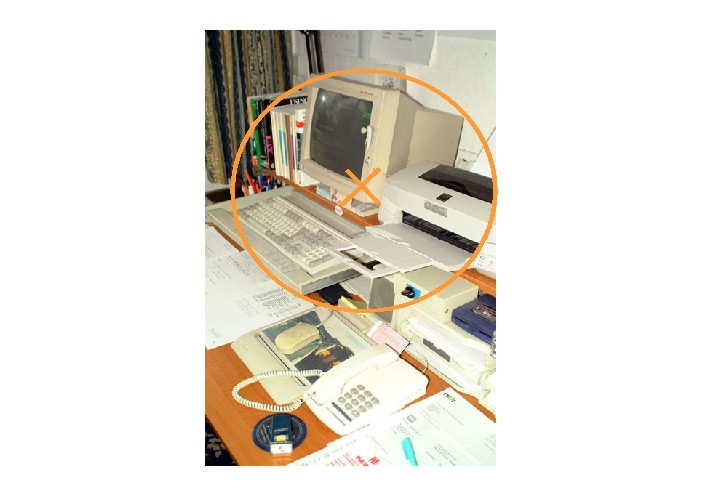 I devised this useful bag of tools to help profile Zones of Attention. If I project a Zone of Attention onto an observed scene or a scene I am visualising in my imagination then I can use the tools to to list information about the contents of the Zone of Attention.
The impossible ideal would be to list everything in the ZOA. This would include physical aspects ranging from every single atom up to the largest objects in the ZOA, and occurences ranging from switching the computer on up to spending hours frantically trying to correct a computer problem.
Obviously the ideal isn't reachable but I want to work with a mindset of working towards that ideal. I also want to ensure that I list both the obvious and the non-obvious. In fact, some things are so obvious that they are difficult to see!
The Tools
Area selection. Duration selection. Pinpoint selection. Size selection. Shape selection. Adjective selection. Colour selection. Volume selection. Action selection. Quantity selection.
Area selection
With area selection I set a question in the format:
What's X?
and I choose a number. For example, 3. Then I choose a measurement - say centimetres - to give:
What's 3 cm?
Then I consider the Zone of Attention (such as the one with the computer above) and pick out objects that are about 3 cm in size, length, diameter etc. Remembering that the Zone of Attention is three dimensional I can pick out any object in the ZOA - including objects that are unseen (inside the computer etc.) I can also allow a degree of guessing.
Possible objects selected for 'What's 3cm?': the logo on the top of the monitor, the return key, the thickness of the front section of the monitor, the length of one of the 'telescopic' sections of the printer tray etc.
This listing could go on indefinitely.
I can select other measurements - I can choose to set a number of different 'What's X?' questions before I start listing information:
What's 1 cm? What's 10 cm? What's 1 mm? etc.
I can range from the smallest measurement (perhaps even considering the atomic level) up to the largest measurement - which would be the diameter of the Zone of Attention itself.
Duration selection
Duration selection can be used to list activities or occurences in the Zone of Attention. As with area spotting it takes the form:
What's X?
and I select a number and any time duration:
What's 1 second?
I then list activities for this Zone of Attention that occur over one second: switching on the PC, taking a piece of paper off the printer tray, shutting down, sipping a coffee, pressing any computer key during typing, etc.
As with area spotting this listing can go on indefinitely. I can also select different durations for different results:
What's a millisecond? What's 10 seconds? What's 3 days? What's 10 years?
For 'What's 10 years' I could consider something like 'the useful lifetime of the computer' , for example.
Pinpoint selection
Pinpoint selection is the simplest method of all: I move the pinpoint (the X inside the ZOA) around the Zone of Attention and name the object that is at the location of the pinpoint.
For example: the computer, the keyboard, the desk, the CPU, the monitor glass, the computer stand etc.
Size selection
With size selection I set a question in the format:
What's the size of X?
For the X I can either select a random object from a page of Directed Association results or choose an object in the Zone Of Attention. These could lead to questions such as:
What's the size of an apple?
What's the size of the space bar?
Shape selection
With shape selection I set a question in the format:
What's the shape of X? (or what's approximately the shape of X?)
For the X I can either select a random object from a page of Directed Association results or choose an object in the Zone Of Attention. These could lead to questions such as:
Random object: What's the shape of an umbrella?
Using an object in the Zone of Attention: What's the shape of the space bar?
Adjective selection
With adjective selection the question is, again, in the format:
What's X?
but I select an adjective for the X myself. I do this by selecting an object/place etc. from the Directed Association results and then listing possible adjectives for that chosen object/place. So if I pick:
Alcatraz prison
then I can list adjectives such as: grey, imposing, closed, historic etc. I can also make up 'adjectives' such as 'featured in a feature film' etc.
I then choose one of the adjectives ('closed' for this example) and then set the question:
What's closed?
and consider what things in the Zone of Attention are closed. For example: the access panel on the computer that is screwed shut (as with the keyboard), the lid of the printer, the books on the shelf etc.
Adjectives I have found to be useful: colour selection and volume selection
I have found that specifying colours and volumes has proved useful when listing information. These are specified for the questions:
What's coloured X?
What's volume: X?
So, for example, resulting questions could be:
What's coloured blue?
What's volume: quiet?
(With the volume question I can range from a scale of 'silent' up to 'deafening'.)
Action selection
With action selection I use the question format:
What's X - ing?
and then list actions. For example: leaving, reading, cooling, amazing, assisting, towering, lowering etc. ad infinitum.
I then select an adjective from the list ( 'cooling') and form a question thus:
What's cooling?
and I can pick out things in the Zone of Attention that are cooling. Perhaps: The monitor (that is cooling as it has been switched off), a cup of coffee, the computer keys (as they haven't been touched by a finger for a while) etc.
I always try to force an answer even when the action is difficult to spot in the Zone of Attention. So if the question was:
What's leaving?
Then to force an answer I could consider that air molecules are 'leaving' this particular Zone of Attention, for example.
Quantity selection
With quantity selection the question takes the format:
There are X what?
I specify a number and then select the object(s) that exist in that quantity within the Zone of Attention.
So for the question:
There are 3 what?
I could choose: 3 pieces of electrical equipment, 3 sections of telescopic printer tray, 3 side of the computer monitor visible etc.
Cyclic profiling
I use this cyclic profiling approach. I select any feature of the Zone of Attention listed using one of the tools above. For example: the computer. Then - as with adjective selection - I simply make a list of adjectives about that object. So with computer I could create a list such as:
Computer = electrical, grey, heavy, technological, frustrating (!), essential, expensive.
I can then select one of these adjectives to form a question such as:
What's electrical?
Then scan the Zone of Attention to list electrical features/objects etc.
Eg: The keyboard, resistors, sockets, printer, cables, static, etc.
Then I repeat the cycle:
Static = annoying, by-product, electrical, shocking
Which results in the question:
What's annoying?
Possible answers: Spilling coffee, computer crash, cables, moving equipment, power failure, printer jam, etc.
Use of superlatives
To use the superlatives approach I simple take the descriptive form of the adjective and change it to a superlative by adding 'est' (even if this creates a word not listed in a dictionary).
For example:
What's loudest? What's annoyingest? What's hottest? What's obsoletest?
Because of the degree of fuzzyness I often have to consider how to interpret the superlative. So with a question like:
What's reddest?
I could take 'reddest' to mean: the object that contains the most red, the object that is most strikingly red, etc. Also if it is fairly obvious that there is nothing red in the Zone of Attention then I look for a degree of redness.
Resources and inspirations:
Web:
Attribute Listing
Book:
TA Today, A New Introduction to Transactional Analysis, Ian Stewart, Vann Joines. Chapter 19: Frame of Reference and Redefining
Saturday, November 19, 2005
Creativity Technique: Track and Freeze
About this post:
Technique in a nutshell: To track a subject, follow it backwards and forwards in time using your imagination (the tracking can be either realistic, fanciful or a mixture of both). To freeze, simply stop tracking the subject ( 'stop time'), consider the subject in its context and describe its surroundings (again this can be realistic, fanciful or a combination of both).
The Track and Freeze approach can serve two functions:
1: As a free association tool it can help to find a subject for creative effort
2: It can help to list information about a subject (see attribute listing and profiling).
To track, I simply pick a subject (maybe with the help of Directed Free Association results) and follow the subject through time in my imagination. To freeze I stop the tracking and 'freeze time': I stop the time progression in order to list information about the space surrounding the subject. I can switch between the two approaches to quickly generate a lot of information about the subject or generate many possibilities for creative attention.
Example of Track and Freeze in use
Suppose I pick 'David Beckham' as a subject. I start out by Tracking him. I do this by visualising him and kind of 'fast forwarding' or 'rewinding' the image I have in my mind. I can go as far back in time as I like and I can write down any information I want that occurs to me during the Tracking. But in this example I opt to stop the Tracking at the point when David Beckham is about to kick off in a football match. Then I can either continue Tracking or apply Freeze. I opt to apply freeze and visualise the scene surrounding Beckham as he is about to kick off. There is a football, a referee, the referee's whistle, the grass on the pitch, the other players, the adverts on the side of the pitch, the fans, the stadium, the floodlights, the car park outside etc. (Of course there's no limit to how much information I can list - I could carry on listing ad infinitum.)
Now I can select something that I've listed during the Freeze and then opt to Track that. I could decide to Track David Beckham once again, but I choose to start Tracking the football. Tracking backwards I go as far as I want into the past: I could see the referee checking the ball to ensure it is inflated correctly, see the ball (and other balls) being transported to the ground, see the ball being manufactured etc. ad infinitum.
I can continue to switch between Track and Freeze and see what information results. There are no strict rules or any set order that should be followed.
It's obvious that this approach can be used either as a free association approach or to list information about a subject. The obvious question is "When is information listed relevant and when does it stop being relevant?" I don't believe there's a straightfoward answer to that. In the David Beckham example then obviously information about the ground, the players and the pitch are relevant but if I'd Tracked the referee back to saying 'goodbye' to his wife when he left for the ground would that be relevant? If the subject is David Beckham and I'm profiling him as the subject then I could always apply the referee information to him: thus I would visualise him saying his goodbyes when he left his own home.
Guessing: Guess-Track and Guess-Freeze
Guessing can play a role when using the Track and Freeze technique. When Guess-Tracking I can follow the subject into the past or into the future. When Guess-Freezing I can guess what is contained in the surroundings of the subject.
Also, as discussed in the guessing post, I can also introduce 'What if?' questions to my considerations and also challenge expectations and assumptions. If I Track David Beckham to the World Cup Final and challenge my expectations/assumptions then an initial assumption could be that David Beckham is participating in the first place. Maybe he could be injured or even retired?
Multiple Beginnings and Endings
If I am Tracking a subject then I can list multiple beginnings and endings of the subject as an aid to Tracking. So if I consider the David Beckham example I could consider multiple beginnings such as: the beginning of each football match he participates in, the beginning of his career at each of his clubs, the beginning of his footballing career, the beginning of his participation in the sport, his birth, his conception etc. If I consider multiple endings then I could consider the end of each match, the end of his contract at each club, the end of his footballing career, his death, the end of the fan's memories of his involvement etc. There is potentially no limit to the number of beginnings and endings that can be listed. If I opt to wander into the realms of 'What if?' I could ask myself "What if his career ended tomorrow?" etc.
Technique in a nutshell: To track a subject, follow it backwards and forwards in time using your imagination (the tracking can be either realistic, fanciful or a mixture of both). To freeze, simply stop tracking the subject ( 'stop time'), consider the subject in its context and describe its surroundings (again this can be realistic, fanciful or a combination of both).
The Track and Freeze approach can serve two functions:
1: As a free association tool it can help to find a subject for creative effort
2: It can help to list information about a subject (see attribute listing and profiling).
To track, I simply pick a subject (maybe with the help of Directed Free Association results) and follow the subject through time in my imagination. To freeze I stop the tracking and 'freeze time': I stop the time progression in order to list information about the space surrounding the subject. I can switch between the two approaches to quickly generate a lot of information about the subject or generate many possibilities for creative attention.
Example of Track and Freeze in use
Suppose I pick 'David Beckham' as a subject. I start out by Tracking him. I do this by visualising him and kind of 'fast forwarding' or 'rewinding' the image I have in my mind. I can go as far back in time as I like and I can write down any information I want that occurs to me during the Tracking. But in this example I opt to stop the Tracking at the point when David Beckham is about to kick off in a football match. Then I can either continue Tracking or apply Freeze. I opt to apply freeze and visualise the scene surrounding Beckham as he is about to kick off. There is a football, a referee, the referee's whistle, the grass on the pitch, the other players, the adverts on the side of the pitch, the fans, the stadium, the floodlights, the car park outside etc. (Of course there's no limit to how much information I can list - I could carry on listing ad infinitum.)
Now I can select something that I've listed during the Freeze and then opt to Track that. I could decide to Track David Beckham once again, but I choose to start Tracking the football. Tracking backwards I go as far as I want into the past: I could see the referee checking the ball to ensure it is inflated correctly, see the ball (and other balls) being transported to the ground, see the ball being manufactured etc. ad infinitum.
I can continue to switch between Track and Freeze and see what information results. There are no strict rules or any set order that should be followed.
It's obvious that this approach can be used either as a free association approach or to list information about a subject. The obvious question is "When is information listed relevant and when does it stop being relevant?" I don't believe there's a straightfoward answer to that. In the David Beckham example then obviously information about the ground, the players and the pitch are relevant but if I'd Tracked the referee back to saying 'goodbye' to his wife when he left for the ground would that be relevant? If the subject is David Beckham and I'm profiling him as the subject then I could always apply the referee information to him: thus I would visualise him saying his goodbyes when he left his own home.
Guessing: Guess-Track and Guess-Freeze
Guessing can play a role when using the Track and Freeze technique. When Guess-Tracking I can follow the subject into the past or into the future. When Guess-Freezing I can guess what is contained in the surroundings of the subject.
Also, as discussed in the guessing post, I can also introduce 'What if?' questions to my considerations and also challenge expectations and assumptions. If I Track David Beckham to the World Cup Final and challenge my expectations/assumptions then an initial assumption could be that David Beckham is participating in the first place. Maybe he could be injured or even retired?
Multiple Beginnings and Endings
If I am Tracking a subject then I can list multiple beginnings and endings of the subject as an aid to Tracking. So if I consider the David Beckham example I could consider multiple beginnings such as: the beginning of each football match he participates in, the beginning of his career at each of his clubs, the beginning of his footballing career, the beginning of his participation in the sport, his birth, his conception etc. If I consider multiple endings then I could consider the end of each match, the end of his contract at each club, the end of his footballing career, his death, the end of the fan's memories of his involvement etc. There is potentially no limit to the number of beginnings and endings that can be listed. If I opt to wander into the realms of 'What if?' I could ask myself "What if his career ended tomorrow?" etc.
Creativity technique: ZOA - Zone Of Attention
About this post
Type of technique: attention directing tool
Technique in a nutshell: imagine you have a three dimensional sphere that you can move around in space. This represents your attention during creative thinking. You can 'zoom in' on objects within the sphere.
Applying the Zone of Attention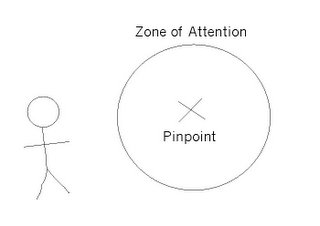
To apply the Zone of Attention technique, I imagine a transparent three-dimensional sphere in front of me. This represents my area of attention during creative thinking. The Zone of Attention also has a pinpoint to fine tune my focusing. I can visualise a Zone of Attention either on something I can directly see, or on a scene that I am visualising or recalling.
Actions on the Zone of Attention
I can carry out three changes on the Zone of Attention:
I can move the ZOA anywhere.
I can change the size of the ZOA.
I can move the Pinpoint within the ZOA.
Varying the size of the ZOA
I use the acronym WUMPP to remind me of my options when changing the size of the ZOA:
W = World
U = Universe
M = Mile
P = Person
P = Pinhead
I can, of course, change the ZOA to any size I like but the acronym helps me to remember (and use) the full extent of the sizing options.
Naming the Zone of Attention
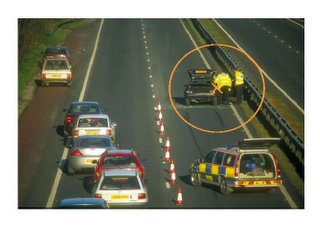 I can give the Zone of Attention a name. This helps when listing information about the contents of the ZOA and helps to avoid listing only the most obvious features within the zone. It also allows the ZOA to be considered as a concept in its own right. So if I am imagining an accident scene such as the one on the right I could name my chosen ZOA 'the accident zone'.
Including myself in the Zone of Attention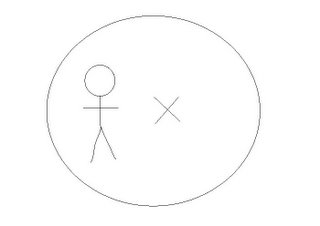
At the start of any creative exercise I find it's a good idea to include myself in the initial Zone of Attention. This helps me to bring my awareness into the here-and-now and consider what my initial goals are during the creativity.
In words this present-moment awareness could be expressed as:
Now Here Me Doing: Brainstorming
or
Now Here Me Doing: Problem-solving
etc.
See also:
Book: Serious Creativity, Edward de Bono
Type of technique: attention directing tool
Technique in a nutshell: imagine you have a three dimensional sphere that you can move around in space. This represents your attention during creative thinking. You can 'zoom in' on objects within the sphere.
Applying the Zone of Attention
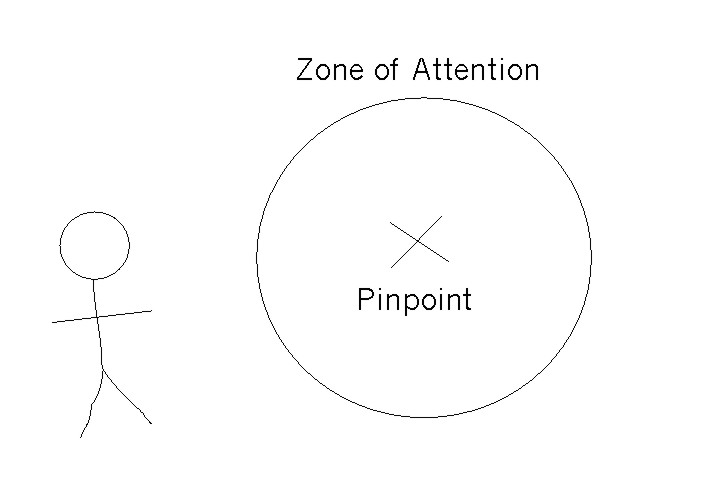
To apply the Zone of Attention technique, I imagine a transparent three-dimensional sphere in front of me. This represents my area of attention during creative thinking. The Zone of Attention also has a pinpoint to fine tune my focusing. I can visualise a Zone of Attention either on something I can directly see, or on a scene that I am visualising or recalling.
Actions on the Zone of Attention
I can carry out three changes on the Zone of Attention:
I can move the ZOA anywhere.
I can change the size of the ZOA.
I can move the Pinpoint within the ZOA.
Varying the size of the ZOA
I use the acronym WUMPP to remind me of my options when changing the size of the ZOA:
W = World
U = Universe
M = Mile
P = Person
P = Pinhead
I can, of course, change the ZOA to any size I like but the acronym helps me to remember (and use) the full extent of the sizing options.
Naming the Zone of Attention
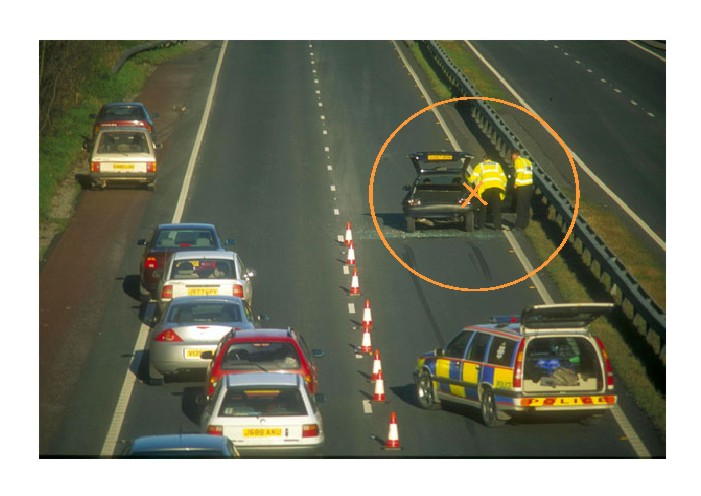 I can give the Zone of Attention a name. This helps when listing information about the contents of the ZOA and helps to avoid listing only the most obvious features within the zone. It also allows the ZOA to be considered as a concept in its own right. So if I am imagining an accident scene such as the one on the right I could name my chosen ZOA 'the accident zone'.
Including myself in the Zone of Attention

At the start of any creative exercise I find it's a good idea to include myself in the initial Zone of Attention. This helps me to bring my awareness into the here-and-now and consider what my initial goals are during the creativity.
In words this present-moment awareness could be expressed as:
Now Here Me Doing: Brainstorming
or
Now Here Me Doing: Problem-solving
etc.
See also:
Book: Serious Creativity, Edward de Bono
Saturday, October 08, 2005
Pre-listing using Google images.
About this post
Use when: you want to name examples of a subject
Example: you want to list types of transport. You look at a Google image and pick something from the image (example: a hill). You then give this word an adjectival function that modifies 'transport': hill transport. This suggests: sledge, tram, cable car, skateboard etc.
Pre-listing using Google Images
Pre-listing is used to name and list examples of a particular subject.
My obejctive in this example - with the subject 'police' - is to name as many types of police as possible, including types, names, categories, specific examples etc.
Example of pre-listing results for 'police':
Short police, bad police, high-ranking police, local police, London police, new police, potential police, ex police, retired police, dead police, original police, dog-handling police, human police, traffic police, etc.
If I choose to I can be more specific with each example given. For example:
Original police = Peelers
High-ranking police = Sir Ian Blair
or I can use the listed information in combination to make new examples:
Dog-handling London police
Local bad police
I can consider that the impossible ideal is 'name ALL police possible', obviously an ideal I could spend the rest of my life pursuing! I want to make the listing create obvious and non obvious options. I can do this with pre-listing using Google images.
Pre-listing using Google images
With this image:
Use when: you want to name examples of a subject
Example: you want to list types of transport. You look at a Google image and pick something from the image (example: a hill). You then give this word an adjectival function that modifies 'transport': hill transport. This suggests: sledge, tram, cable car, skateboard etc.
Pre-listing using Google Images
Pre-listing is used to name and list examples of a particular subject.
My obejctive in this example - with the subject 'police' - is to name as many types of police as possible, including types, names, categories, specific examples etc.
Example of pre-listing results for 'police':
Short police, bad police, high-ranking police, local police, London police, new police, potential police, ex police, retired police, dead police, original police, dog-handling police, human police, traffic police, etc.
If I choose to I can be more specific with each example given. For example:
Original police = Peelers
High-ranking police = Sir Ian Blair
or I can use the listed information in combination to make new examples:
Dog-handling London police
Local bad police
I can consider that the impossible ideal is 'name ALL police possible', obviously an ideal I could spend the rest of my life pursuing! I want to make the listing create obvious and non obvious options. I can do this with pre-listing using Google images.
Pre-listing using Google images
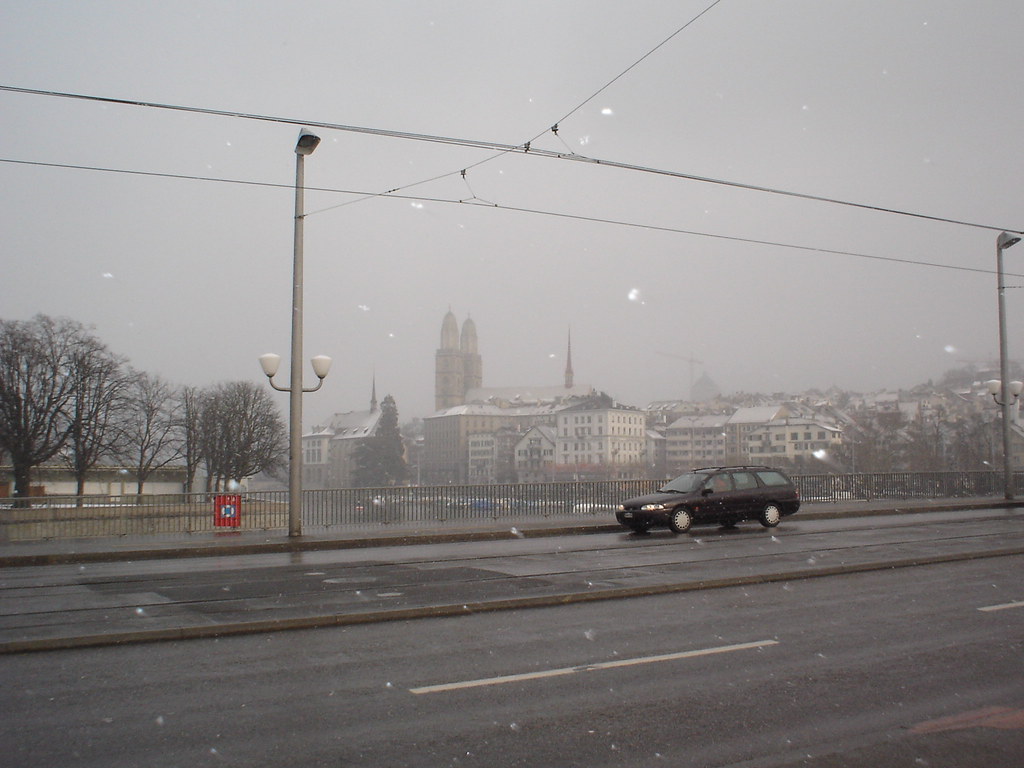
With this image:
I simply pick out something I see in the image:
Car
and then that word takes an adjectival function to modify 'police':
Car police
'Car police' is the first item on the list, but I can also use 'car police' to trigger more specific examples, or I can interpret it. I find it's a good idea to set a quota (say five) to both list the obvious and then go beyond the obvious:
Car police = Transport police
Car police = Police trained to drive fast
Car police = Police who investigate car theft
Car police = Police who get to work by car
Car police = Police officers who are car enthusiasts
I can also step up the concept level or describe the car:
Concept level: Car = vehicle
Description: Car = pollutant
and then use 'vehicle' and 'pollutant' as trigger words, with the quota of five again.
Word triggers
I like to use the letters of listed words as word triggers. So with words listed above such as:
Car, vehicle, pollutant
I take the first three letters: car, veh, pol, and use them to trigger more words. I try to list words of one syllable, two syllables and over. For example:
Carpet, carnage, caramel
Vehement
Polite, political, polished, Polish
and then again use these (often with a quota of five) to list further examples.
For example:
Carnage police = police who have been involved in pile-ups, police who investigate crashes, police who have caused accidents, etc.
With a 'difficult' word such as 'caramel' I still try to complete the quota of five, although more thinking is often needed to complete the connection!
Caramel police = police who investigate food standards, police who like caramel (!), police who are 'sweet', police who have caramel for lunch, police with the surname 'caramel' etc
Seeing beyond the obvious choices
I cannot resist the temptation to stretch my thinking beyond the obvious when choosing elements of the Google image and completing my list!
With the same image used above:
I pick out an object (say, the car again, for this example) and then describe it with an adjective (or a word that has a modifying function). For example:
Car = black
Then, with another image such as:

Two obvious possibilities here are: the writing, the drawing.
"Writing" and "drawing" now become my modifying words:
Writing police
Drawing police
Again I can set quotas at each stage. In answer to the directive "Name something black" I could have forced myself to list five black things in the picture. Also with any listing I can name five further examples triggered. For example:
Writing police = police who've written books, police who write for papers, John Stalker (who seems to be 'rent-an-opinion' when police matters are discussed in the media!), police who enjoy paperwork, police who have taken admin positions due to being injured on the job, etc.
Random images
I find the images using Google image search. For the search subject I simply use a random letter and random number in combination, such as "c 77".
Conclusion
It's obvious that this nice bag of tricks produces some disparate focuses. Also what I like about these approaches is that they uncover assumptions you would make when listing purely from memory: if you were listing police would you think of listing the dogs as members of the police? Would you think of listing people who impersonate police officers? Would you think of listing fictional officers? Tazmanian officers? The approaches above help to create a sizeable chunk of that impossible ideal of 'list everything possible'.
Monday, August 08, 2005
A strategy to find assumptions
About this post
Type of technique: assumption finding
Technique in a nutshell: Say you want to list assumptions about the moon, for example. You can set a directive 'name assumptions about the moon'. But you can also modify that directive with set words (such as time, place, person). Thus: 'Name person assumptions about the moon'. Possible answers: we assume only people have visited the moon, we assume that people have gone to the moon.
A Strategy to Find Assumptions
I've been using this approach to help find assumptions.
Imagine a bomb-damaged tree at an old WWII air base - such as Biggin Hill. A number of assumptions are automatically made about the bomb-damaged tree. In the search for assumptions a directive such as:
List assumptions about the bomb-damaged tree
can be made. However, this can be modified using the category headings:
Time (duration) Place (area) Thing (object) Person Doing (Activity) Being (Is) Having (Has) Saying (utterance) Knowledge
If I select 'time' from the category headings I can rewrite the directive thus:
List time-assumptions about the bomb-damaged tree
I reckon that my first time-assumption is that the bomb damage occured during WWII. Maybe the damage could have occured at some other time?
If I select the 'duration' part of the category I make the directive:
List duration-assumptions about the bomb-damaged tree
Which makes me realise I assume the damage occured at one time. Maybe the tree could have been damaged on more than one occasion in the war or whenever.
Using 'person(s)' gives the directive:
List person(s)-assumptions about the bomb-damaged tree
which makes me realise I'd assumed the damage was caused by German bombers. Maybe the tree could have been damaged by a plane colliding with it and detonating its bombs etc.
Type of technique: assumption finding
Technique in a nutshell: Say you want to list assumptions about the moon, for example. You can set a directive 'name assumptions about the moon'. But you can also modify that directive with set words (such as time, place, person). Thus: 'Name person assumptions about the moon'. Possible answers: we assume only people have visited the moon, we assume that people have gone to the moon.
A Strategy to Find Assumptions
I've been using this approach to help find assumptions.
Imagine a bomb-damaged tree at an old WWII air base - such as Biggin Hill. A number of assumptions are automatically made about the bomb-damaged tree. In the search for assumptions a directive such as:
List assumptions about the bomb-damaged tree
can be made. However, this can be modified using the category headings:
Time (duration) Place (area) Thing (object) Person Doing (Activity) Being (Is) Having (Has) Saying (utterance) Knowledge
If I select 'time' from the category headings I can rewrite the directive thus:
List time-assumptions about the bomb-damaged tree
I reckon that my first time-assumption is that the bomb damage occured during WWII. Maybe the damage could have occured at some other time?
If I select the 'duration' part of the category I make the directive:
List duration-assumptions about the bomb-damaged tree
Which makes me realise I assume the damage occured at one time. Maybe the tree could have been damaged on more than one occasion in the war or whenever.
Using 'person(s)' gives the directive:
List person(s)-assumptions about the bomb-damaged tree
which makes me realise I'd assumed the damage was caused by German bombers. Maybe the tree could have been damaged by a plane colliding with it and detonating its bombs etc.
Saturday, August 06, 2005
IF-forcing
About this post
Type of technique: breaking rules and forming thought experiments
Technique in a nutshell: write a simple fact about something. Example: cows produce milk. Then force a conditional aspect using 'if': cows produce milk IF they are alive. Experiment with replacement for the 'alive': dead, elderly, male etc.
If-forcing
I've been finding that this IF-forcing approach can lead to ideas. Especially simple ideas. I start by writing down a fact about the subject and then working out how the fact is conditional by using 'if'.
So, for example, with subject 'gun' I write down a fact about a gun:
a gun fires.
Using 'if' to find the conditional aspect gives:
A gun fires if you pull the trigger.
Then I can play about with the condition or parts of the condition. I can remove the subsequent part of the sentence giving:
A gun fires if...
and then consider alternatives such as:
A gun fires if you breathe onto it
A gun fires if you hold it above your head
A gun fires if you point it towards yourself
That last one is an interesting concept for fiction. A gun could be made in a way that makes a bullet fly in the opposite direction. So the 'baddie' can put the gun in their mouth to look as though they are about to shoot themselves when really the bullet will fly in the normal direction.
I can keep the sentence as it stands:
A gun fires if you pull the trigger
and opt to change just one word:
A gun fires if you pull TWO triggers.
Which would be a more secure gun.
It's worth writing down as many conditional aspects as possible:
A gun fires if it is loaded
A gun fires if it has a barrel
A gun fires if it works
A gun fires if you are carrying one in the first place
A gun fires if you have fingers
A gun fires if the bullet is live
It's quite a simple yet effective method for finding assumptions.
Type of technique: breaking rules and forming thought experiments
Technique in a nutshell: write a simple fact about something. Example: cows produce milk. Then force a conditional aspect using 'if': cows produce milk IF they are alive. Experiment with replacement for the 'alive': dead, elderly, male etc.
If-forcing
I've been finding that this IF-forcing approach can lead to ideas. Especially simple ideas. I start by writing down a fact about the subject and then working out how the fact is conditional by using 'if'.
So, for example, with subject 'gun' I write down a fact about a gun:
a gun fires.
Using 'if' to find the conditional aspect gives:
A gun fires if you pull the trigger.
Then I can play about with the condition or parts of the condition. I can remove the subsequent part of the sentence giving:
A gun fires if...
and then consider alternatives such as:
A gun fires if you breathe onto it
A gun fires if you hold it above your head
A gun fires if you point it towards yourself
That last one is an interesting concept for fiction. A gun could be made in a way that makes a bullet fly in the opposite direction. So the 'baddie' can put the gun in their mouth to look as though they are about to shoot themselves when really the bullet will fly in the normal direction.
I can keep the sentence as it stands:
A gun fires if you pull the trigger
and opt to change just one word:
A gun fires if you pull TWO triggers.
Which would be a more secure gun.
It's worth writing down as many conditional aspects as possible:
A gun fires if it is loaded
A gun fires if it has a barrel
A gun fires if it works
A gun fires if you are carrying one in the first place
A gun fires if you have fingers
A gun fires if the bullet is live
It's quite a simple yet effective method for finding assumptions.
Subscribe to:
Posts (Atom)

 Posts
Posts

